
Talk Dirty Dance AI Prompt Guide: The 259-Word Prompt, Line by Line
The Talk Dirty dance AI prompt runs 259 words to put the person in your photo in the lead's spot, keeping every light and flame. Or skip it: $9.90 at 720p.
 Talk Dirty Dance AI Team14 min read
The Talk Dirty Dance AI team: we watch every Talk Dirty dance clip we write about, date every view count we quote, and show the trend with videos made on our own generator.

TL;DR — The Talk Dirty dance AI prompt is the 259-word, five-sentence edit prompt our maker runs. It puts the person from one photo in the lead's spot of the 15-second stage clip and keeps everything else. You'd paste it, with the stage clip and your photo, into a tool that edits a video you upload. On our Talk Dirty dance AI maker, it's built in, so you add one photo instead, and one 15-second 720p video is $9.90.
Most of the trend's videos come from one of two CapCut templates, both posted on October 17, 2026. You add a photo, the edit runs out of sight, and the words behind the swap never show.
In a sample of 92 trend videos on TikTok that we checked on October 21, 2026, 82 carried a link to one of those templates.
Those hidden words carry a heavy load, because the lighting doesn't stop shifting across 15 seconds.
The clip drops into near blackout at 1.0 second and hits a white flash at 1.2 seconds. Then a white spotlight switches on at 2.4 seconds, and orange light floods the stage at 3.5 seconds. Flame columns fire at least nine times along the way.
A working prompt has to keep one new face steady through every single change.
Here's our prompt, word for word, the exact text our maker runs, and what each of its five sentences does.
The video above is our homepage sample, and it's what came back from these exact words on October 21, 2026.
The Talk Dirty Dance AI Prompt, Ready to Copy (259 Words)
The Talk Dirty dance AI prompt below is the full text our maker sends with every photo, as of October 21, 2026.
Edit the video. Replace the bearded man with long curly hair in the navy-blue suit, light-blue shirt and pink-red tie, holding a small white microphone, who dances at the centre of the stage in front of the row of dancers, with whoever is in @Image 1 (a person, or a cartoon or game character, or a pet when @Image 1 shows one): their face, hair, body and whole outfit come from @Image 1 only, and they stay exactly the same in every second from the first frame to the last, through every zoom, blackout, spotlight, colour change of the stage light and flame burst. They do not wear the navy-blue suit, the light-blue shirt, the pink-red tie or the small lapel pin, and do not have the man's full beard or his long curly hair, dark or blond, unless @Image 1 shows them. Keep everything else exactly unchanged: every dance step and movement, the timing, the small white microphone in one hand, the phone camera filming from the crowd just below the front edge of the stage with its zooms and its framing, the dancers in yellow-and-black and red-and-black varsity jackets with wide black trousers, the dancer with long dreadlocks, the dancer in the blue cap and everyone else on stage with their own faces, the flame columns shooting up at the front of the stage, the white spotlight, the round floor lights and the blue, white and orange stage light, the drum riser and the giant white letters on the screen behind the stage. No captions or subtitles.The copy button on the box takes all 259 words.
In this text, @Image 1 is the name the prompt gives your photo. It edits the 15-second stage clip, framed 9:16 (the tall frame TikTok and Reels use).
Sentence by Sentence: What the Talk Dirty Dance AI Prompt Tells the Editor
The Talk Dirty dance AI prompt has five sentences, and each one has a single job. The five sentences run 3, 101, 39, 112 and 4 words. The longest one, sentence 4 at 112 words, is the one that keeps the stage as it is.
Sentence 1: "Edit the video."
Sentence 1 uses three words to set up an edit prompt (instructions that change a video you give the tool, rather than making one from nothing). It tells the software to take the stage clip you give it and change it directly. You aren't creating a stage from scratch.
Sentence 2: Whoever Is in @Image 1 Takes the Lead's Spot
Sentence 2 runs 101 words to define who steps into the middle of the stage.
First, it picks out the lead only by what you can see. It names "the bearded man with long curly hair in the navy-blue suit".
It adds that he's "holding a small white microphone". Then it places him as the one "who dances at the centre of the stage in front of the row of dancers".
That description is enough to single him out, because he's the only person on stage in a suit. Every dancer wears a varsity jacket.
Second, the sentence says that "their face, hair, body and whole outfit come from @Image 1 only". That line asks for the whole look to come from your photo, not from the lead. In our sample, the lead's suit, tie, beard and curls don't show up in any frame.
Third, it locks their look so "they stay exactly the same in every second from the first frame to the last". It holds that look "through every zoom, blackout, spotlight, colour change of the stage light and flame burst".
That rule names each kind of change the clip goes through. It covers the near blackout at 1.0 second and the dark stage at 1.8 seconds. It also covers the white spotlight at 2.4 seconds and the orange stage light at 3.5 seconds.
In our sample, the man from the photo is still the same man, in the same clothes, at each of those moments.
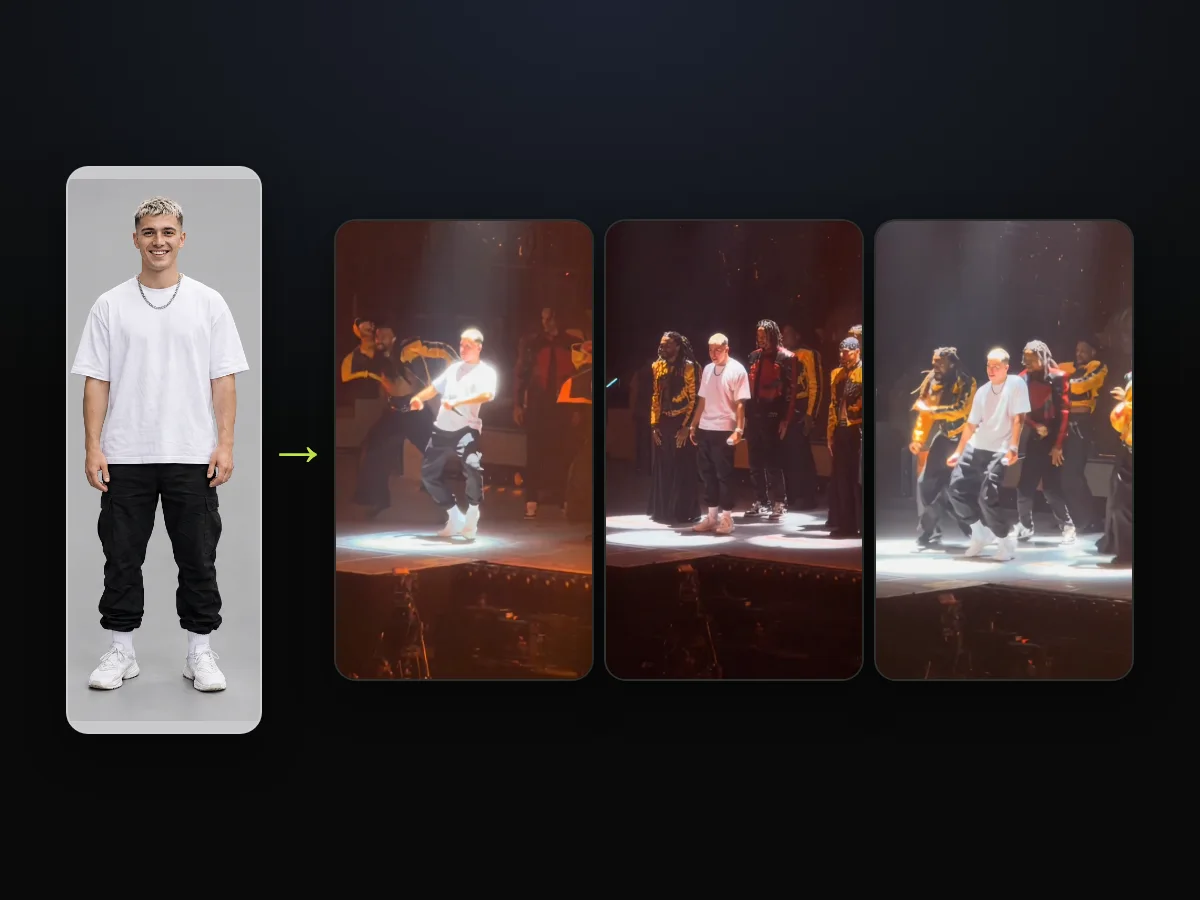
Here's how one photo carries the same outfit across different stage lights.
Sentence 3: Leave the Suit, the Beard and the Curls Behind
Sentence 3 lists the lead's styling and asks for none of it on the person you've added.
- His clothes: It asks for no navy-blue suit, light-blue shirt, pink-red tie or small lapel pin. In our sample, none of the four shows up in any frame.
- His beard and hair: The prompt drops the full beard and "his long curly hair, dark or blond".
The phrasing adds "unless @Image 1 shows them". If your photo has a beard or long curls, they're yours and they stay.
Sentence 4: "Keep everything else exactly unchanged"
Sentence 4 is the keep list (the part of the prompt that names what stays). At 112 words, it's the longest sentence in the prompt, so the longest part of the prompt is about what must not change.
- The routine: It preserves "every dance step and movement, the timing", keeping the clip's own choreography.
- The microphone: It keeps "the small white microphone in one hand" so the new lead holds it through the routine.
- The phone camera: It holds "the phone camera filming from the crowd just below the front edge of the stage" with its zooms and framing.
- The varsity-jacket crew: It names the dancers in yellow-and-black and red-and-black varsity jackets. It also picks out the dreadlocked dancer and the one in the blue cap, and it leaves "everyone else on stage with their own faces".
- The flames and lights: It protects "the flame columns shooting up at the front of the stage", the white spotlight, the round floor lights and the blue, white and orange stage light.
- The drum riser and letters: It maintains the drum riser and "the giant white letters on the screen behind the stage".
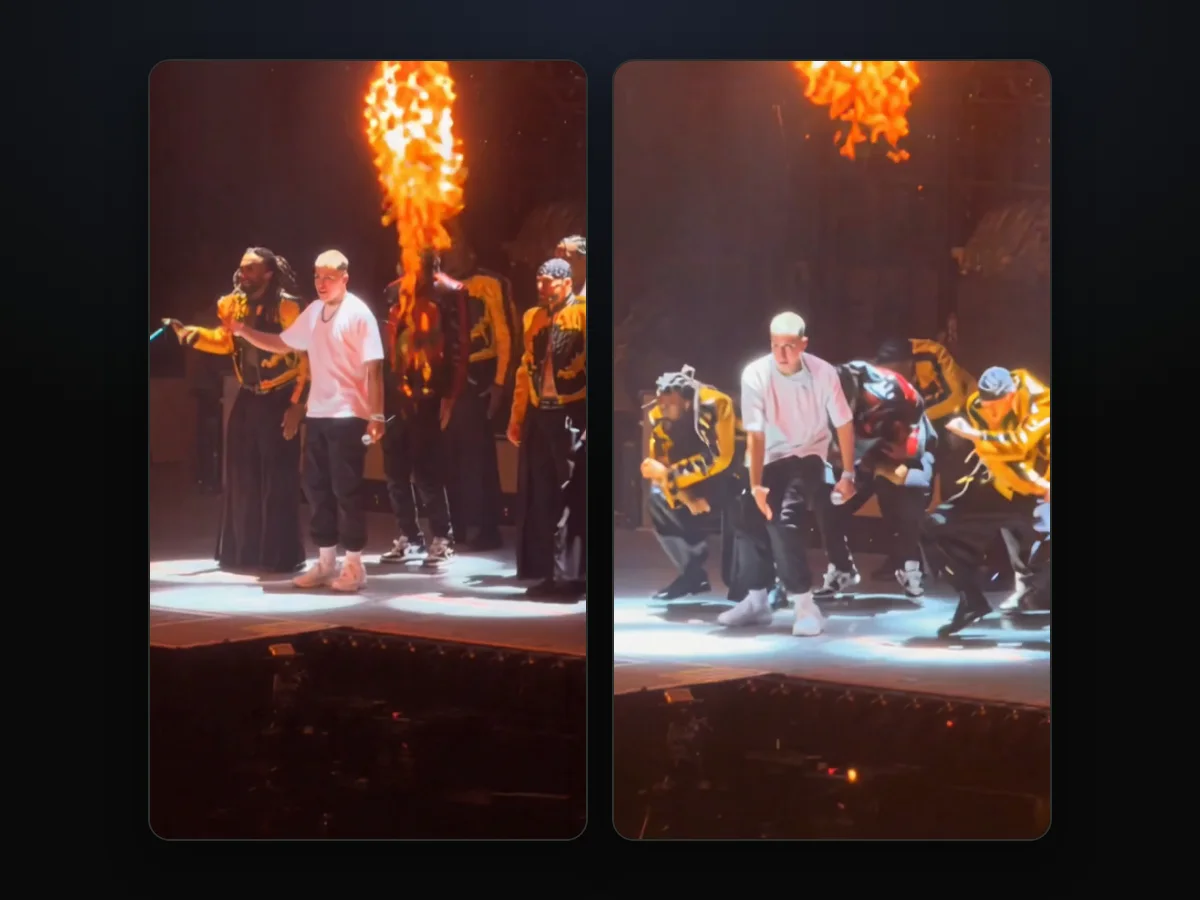
That's sentence 4 at work: it keeps the entire stage setting intact, and only the lead changes.
Sentence 5: "No captions or subtitles."
Sentence 5 closes the prompt with "No captions or subtitles." across four words. It asks for no captions or subtitles, but it doesn't ask for no text. That's because the giant white letters on the screen behind the stage are part of the scene, and they stay.
Our exported videos add nothing on top and carry no watermark, so your own caption goes on when you post.
Skip the Prompt: Our Talk Dirty Dance AI Maker Runs It for You
Our Talk Dirty dance AI maker sends this exact prompt with your photo, so you never paste a word. You'll walk through the whole process on our site in a few simple choices:
- Your photo: You can feature yourself, a friend, a parent or another family member, each 18 or older. A cartoon, game or AI-made character works too. A box, ticked when the page opens, confirms you can use the photo and anyone in it is 18 or older.
- The quality: You pick between 480p, 720p or 1080p, with 480p picked when the page opens.
- The Create button: The Create button shows the price before you pay. You tap it, pay once as a guest, and your video starts on the same page.
You pay $9.90 for one 15-second 720p video as a guest with no account, or you can check every credit pack on our pricing page.
With Talk Dirty Dance AI, pressing Create holds the video's credits, and they're spent only when the video is ready. After you pay, we email the address you paid with. To keep your videos on another device, open the link in that email and sign in.
If you'd like a step-by-step walkthrough, read the full three-tap tutorial for the upload flow.
If you've run into issues on TikTok first, check the CapCut template fixes to see how to handle errors.

What the Talk Dirty Dance AI Prompt Needs Beside It
The Talk Dirty dance AI prompt works only next to three things: the stage clip, your photo and a tool that edits a video you upload. The sound is a fourth step that comes after the edit. So if you run it on your own outside our maker, you'll have to bring all four pieces together:
- A video-edit tool: You'll need software that takes an uploaded video and an image together and changes the video.
- The 15-second stage clip: You'll need the continuous 15-second take filmed from the crowd, framed 9:16, with nothing written on it except the screen's own giant letters.
- One photo as @Image 1: You'll need one person or one character, ideally facing the camera in clear light. For our own sample, @Image 1 was a character sheet with a face close-up and four full-body views.
- The live sound, added afterwards: The prompt says nothing about sound, so the audio is a separate step. Our maker adds the clip's own live sound back once the edit is done.
When you add one photo to our Talk Dirty dance AI maker, we bring all four parts together on our page. You can also review Talk Dirty dance AI generators, sorted by what you get back to see what other tools produce.
Why the Talk Dirty Dance AI Prompt Is Written This Way
Every choice in the Talk Dirty dance AI prompt points the edit at one person on a busy stage and leaves the rest alone. The phrasing reflects the specific visual details of the live concert take:
- No names: The prompt names no person, song, tour or creator, pointing at the lead only by what you can see.
- His clothes, piece by piece: It names the navy-blue suit, light-blue shirt, pink-red tie and small lapel pin one by one. So the instruction to leave them out covers each item by name.
- The beard and both hair colours: It lists the full beard and both hair colours so neither shade carries over to your person.
- "The same in every second": It tells the editor to keep the person uniform through zooms, blackouts, spotlights and flame bursts.
- Letters, not text: It asks for no captions or subtitles rather than no text, preserving the arena screen's giant letters.
You can read about where the stage clip comes from to see the history of the original stage footage.
You can also explore the song behind the Talk Dirty dance trend to see which song it is and the live sound the videos play.
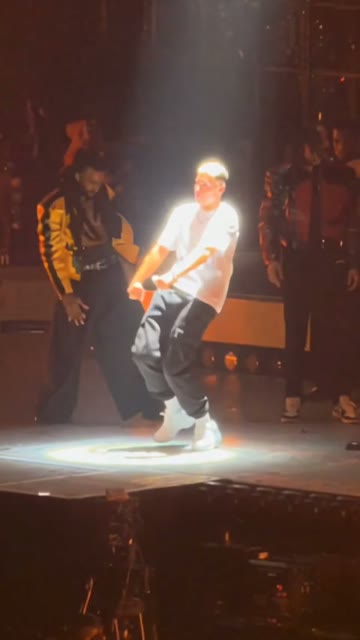
Here's the spotlight crouch at 2.9 seconds, with the dancer in the yellow-and-black jacket on the left and the new lead holding the mic.
Talk Dirty Dance AI Prompt: Your Questions
The Talk Dirty dance AI prompt brings up practical questions about how the words interact with the stage clip. Here are the facts behind the edit text.
What does @Image 1 mean in the Talk Dirty dance AI prompt?
The @Image 1 tag is the name the prompt gives your photo. The video being edited is the 15-second stage clip, and you give one photo per video to take the lead's spot.
Why doesn't the prompt name the lead or the song?
The prompt describes the lead only by visible details and names no person, song, tour or creator. The song the trend dances to is "Talk Dirty" by Jason Derulo featuring 2 Chainz, released on August 2, 2013. Our videos carry the clip's own live sound, laid in after the edit.
Why does the prompt keep the microphone?
The microphone is part of the performance, so the prompt lists it among the things that stay rather than his things that go. The new lead holds the small white microphone in one hand throughout the routine.
Will the prompt keep my own outfit?
Yes, your subject's entire outfit comes from @Image 1 only. The original suit, shirt, tie and lapel pin don't carry over unless your photo shows them.
Why does the prompt say "dark or blond" about the hair?
The lead's curls look dark in the dim light until the white spotlight comes on, 2.4 seconds in, and blond from then on. Naming both keeps either look off your photo's person unless the photo shows it.
Let the Talk Dirty Dance AI Maker Handle the Prompt
Our maker bundles all 259 words across five sentences to place your photo in the center while keeping the entire arena stage intact. You don't have to copy words or track down footage when you can just upload one photo. You can make a Talk Dirty dance AI video directly for $9.90 at 720p.
Written by the Talk Dirty Dance AI Team. The prompt in this guide is the one our maker runs, and the man in our sample is a fictional person made with AI.
Related Articles
- Talk Dirty Dance AI Tutorial: Put a Friend on the Stage in 3 Taps — who to put in the lead's spot, then the three taps from photo to MP4
- Talk Dirty Dance Trend: From the 2013 Hit to the AI Stage Swap — the song, the stage and the October 2026 AI wave, with dates
- Talk Dirty to Me Dance Trend: Which Song It Is (and Which It Isn't) — the hook, the song's real name and the titles people mix it up with
- Talk Dirty Dance CapCut Template Not Working? 6 Fixes — what to do when the CapCut route stalls, asks to pay or opens the wrong template
- Talk Dirty Dance AI Generators Compared: Which Keep the Real Stage? — the tools sorted by what you get back


